← All software
Applications
File Compare
See exactly what changed between two files. File Compare puts them side by side and colours every difference — missing lines in red, added lines in green, changed lines in blue — so you can take in at a glance what would otherwise take an hour of squinting.
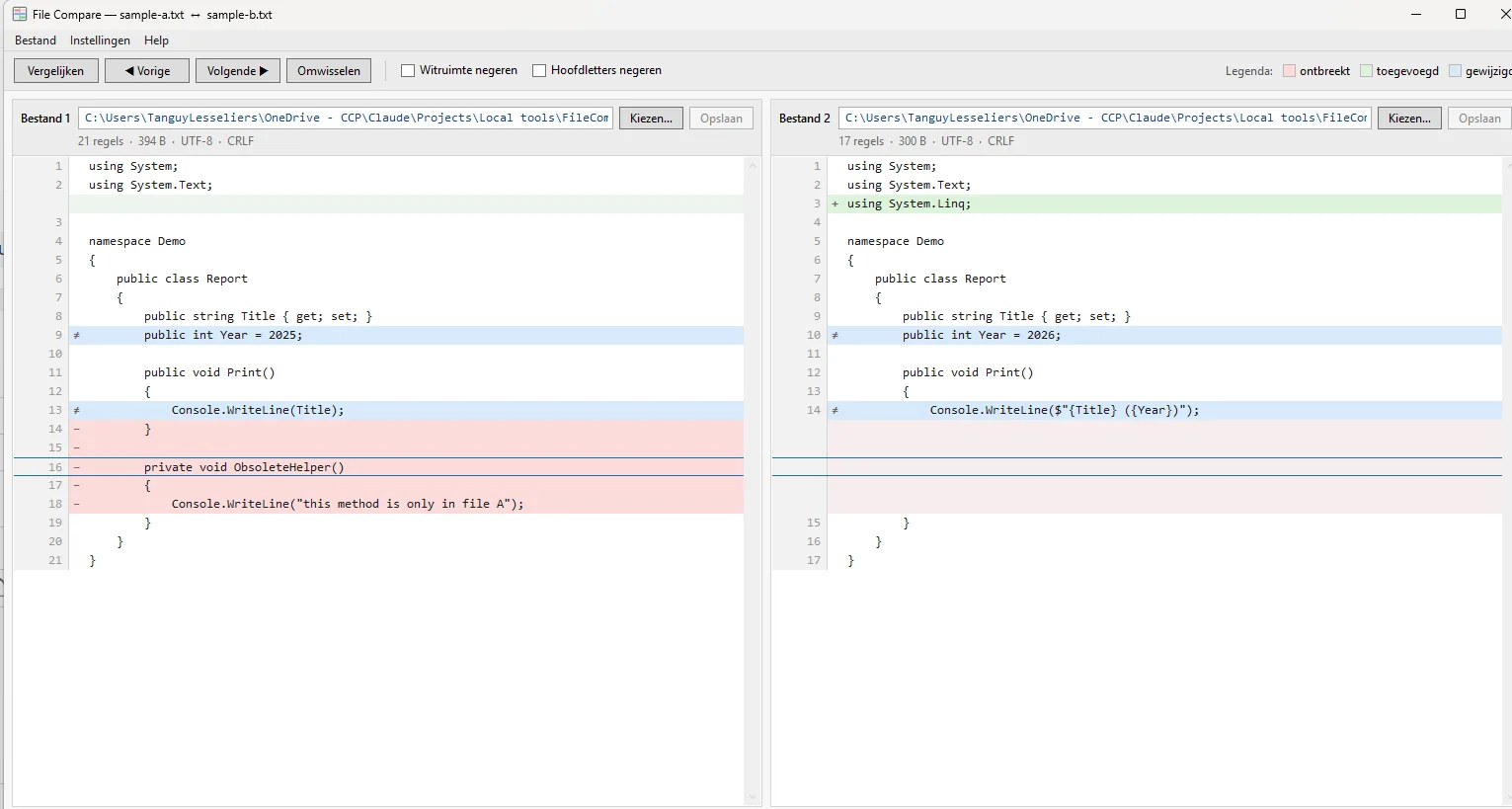
File Compare is a lightweight Windows desktop tool that answers "what is actually different between these two files?" without reading them line by line. Pick a file on each side and it aligns them so matching lines sit at the same height, then tints every line by what happened to it: light red where a line is missing, light green where one was added, and light blue where both sides have a line whose content has changed. The two panels scroll as one, line numbers stay visible, and each panel always shows the full path of the file it is displaying — so you never lose track of which version you are looking at. It handles anything from a two-line config file to a hundred thousand lines of log.
Press F3 to step through the differences one block at a time, and the status bar keeps a running count of how many lines were changed, added, missing or identical. Two toggles handle the noise: ignore whitespace, for files that have only been reindented, and ignore case. When you need to reconcile the files rather than just inspect them, switch on "Allow modifications" and you can copy a single line — or a whole block of consecutive differences — from either side to the other, with unlimited undo. Nothing is written to disk until you choose to save, the previous version of a saved file is always kept beside it as a .bak, and the original encoding, byte-order mark and line-ending style are preserved exactly, so a save never quietly reformats a file.
It runs entirely on your PC — no account, no upload, nothing leaves the machine — and it opens as a read-only viewer until you deliberately allow changes. It installs per-user without administrator rights, and remembers the two files you had open, your language and your options, so the next session picks up where you left off. The interface is available in English, French and Dutch.
Feature highlights:
- Side-by-side view with every difference colour-coded: missing, added, changed
- Perfect line-for-line alignment and synchronised scrolling in both directions
- Step through differences with a single key; live counts in the status bar
- Ignore whitespace and ignore case, for reindented or renamed content
- Optionally copy single lines or whole blocks between the files, with full undo
- Nothing written until you save; automatic .bak of the previous version
- Encoding, BOM and line endings preserved exactly on save
- Opens read-only by default; modifications are a deliberate choice
- English, French & Dutch; remembers your files, language and settings
- Runs locally, installs without admin rights, handles 100,000-line files comfortably
Get the download link
Enter your e-mail address and we'll send you a download link. The link can be used up to 2 times.